 Yaroslav Shmarov
· Published
How to switch whistleblowing software without a gap #
Most organisations plan to change whistleblowing software on the day the old contract ends. That plan has a problem. On that day, the old tool still holds open cases, and the people who reported them still use it to send messages. The new tool cannot take those cases over.
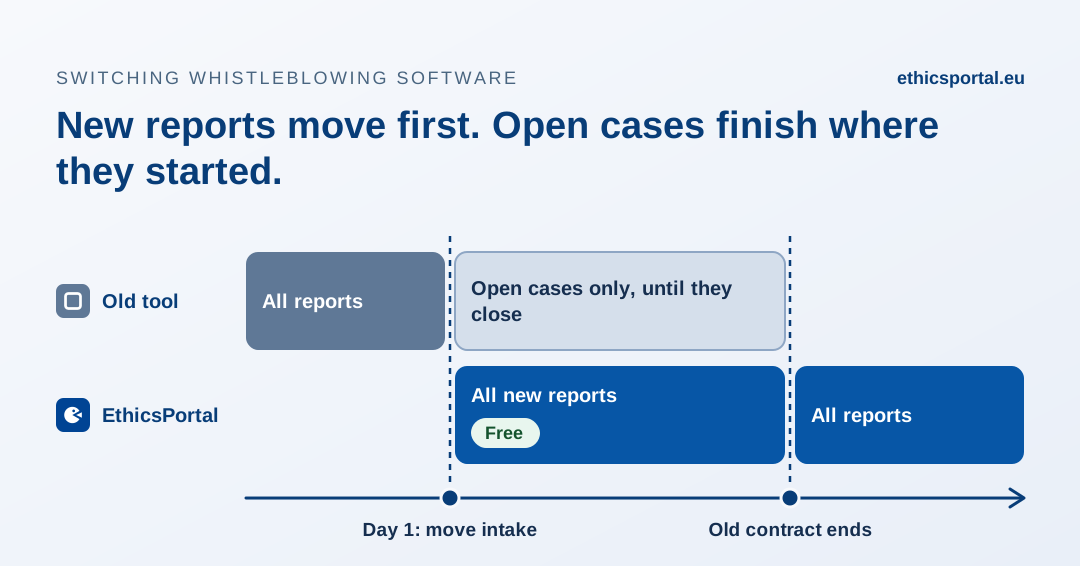
So a switch needs an overlap period. New reports go to the new whistleblowing channel. Open cases finish in the old one. This guide explains how to plan that period, and how EthicsPortal makes it free.
Why open cases cannot move #
A report is more than a text. It is a conversation with a reporter, often an anonymous one, who returns with a case ID and a password that only the old system knows. The case also has a history: the date of receipt, the acknowledgement, the messages, the decisions and the audit trail.
You can export that history as a record. You cannot move the conversation. The reporter’s login does not exist in the new tool, and you cannot contact an anonymous reporter outside the channel to give them a new one.
The legal deadlines also continue. Under Article 9 of Directive 2019/1937, you must acknowledge each report within 7 days and give feedback within 3 months. For an open case, the old tool is where you meet those deadlines.
The switch, step by step #
1. Check the old contract #
Find four facts before you plan:
- The end date and the notice period. Many contracts renew automatically if you do not give notice in time.
- The export. Ask in which format you get case records, messages, attachments and audit logs.
- Access after the end date. Some vendors keep read-only access for a period. Others delete the data.
- Intake. Ask whether the vendor can close the form for new reports and keep existing cases open. This makes the overlap cleaner.
2. Move intake on day 1 #
Set up EthicsPortal: case handlers, report categories, languages and your whistleblowing policy. Then replace the old link in every place where people find it:
- the website footer and the whistleblowing policy page
- the intranet, the employee handbook and posters
- instructions for phone and in-person reporting, if you offer them
- supplier and partner documents, if external persons can report
From this day, new reports go to EthicsPortal. The old tool receives only messages about open cases.
3. Run both tools during the overlap #
Assign one person to check the old tool on a fixed schedule, for example every two working days. Reporters with open cases will continue to use it. Every deadline that started in the old tool ends in the old tool.
If a reporter submits a new matter in the old tool by mistake, answer there and tell them where to report new matters.
4. Close down the old tool #
Before the contract ends:
- Close the cases you can. Give feedback and record the outcome.
- Document the cases you cannot close. Export the full record. In the old tool, tell the reporter that the channel will close on a fixed date, and how to continue: a new report in the new channel that refers to the old case ID.
- Export everything for retention. Keep the case records and audit trails for the period your policy and national law require.
5. Update your records #
A new vendor is a new data processor. Sign the data processing agreement, update your record of processing activities and the privacy notice for reporters. Where national law requires it, inform or consult employee representatives before you change the system.
Free until your current contract ends #
The overlap period is the reason many organisations wait. Nobody wants to pay two vendors for the same months, so the switch moves to the last possible day, and the open cases have nowhere to go.
EthicsPortal is free for your organisation from the day you move intake until your current contract ends, for up to 12 months. Billing starts the day after. You pay one vendor at a time, and you can start the overlap up to a year before your current contract ends.
To use this, tell us the end date of your current contract when you set up EthicsPortal. We do not need the contract itself, and we do not need any report data from the old tool.
If you leave EthicsPortal later #
The same rules apply in the other direction. Every report exports to PDF with its full message history, timeline and audit trail, and administrators can export all organisation data as a ZIP file at any time. See the FAQ for details.